

- Stream: one broadcast night and its matches. Streams are set up on Schedule, and Live works in one stream at a time.
- Scorecard: one match while it’s being scored, from Create Scorecard to Finish Scorecard. Only one can be open at a time.
Before you start
- You need access to operate Live. See How access works.
- Add the stream and its matches on Schedule. A match can be scored only when it’s in the stream, has both teams set and has no result yet. See Plan the schedule.
- Set up OBS on the broadcast PC. See Set up OBS.
Score a match
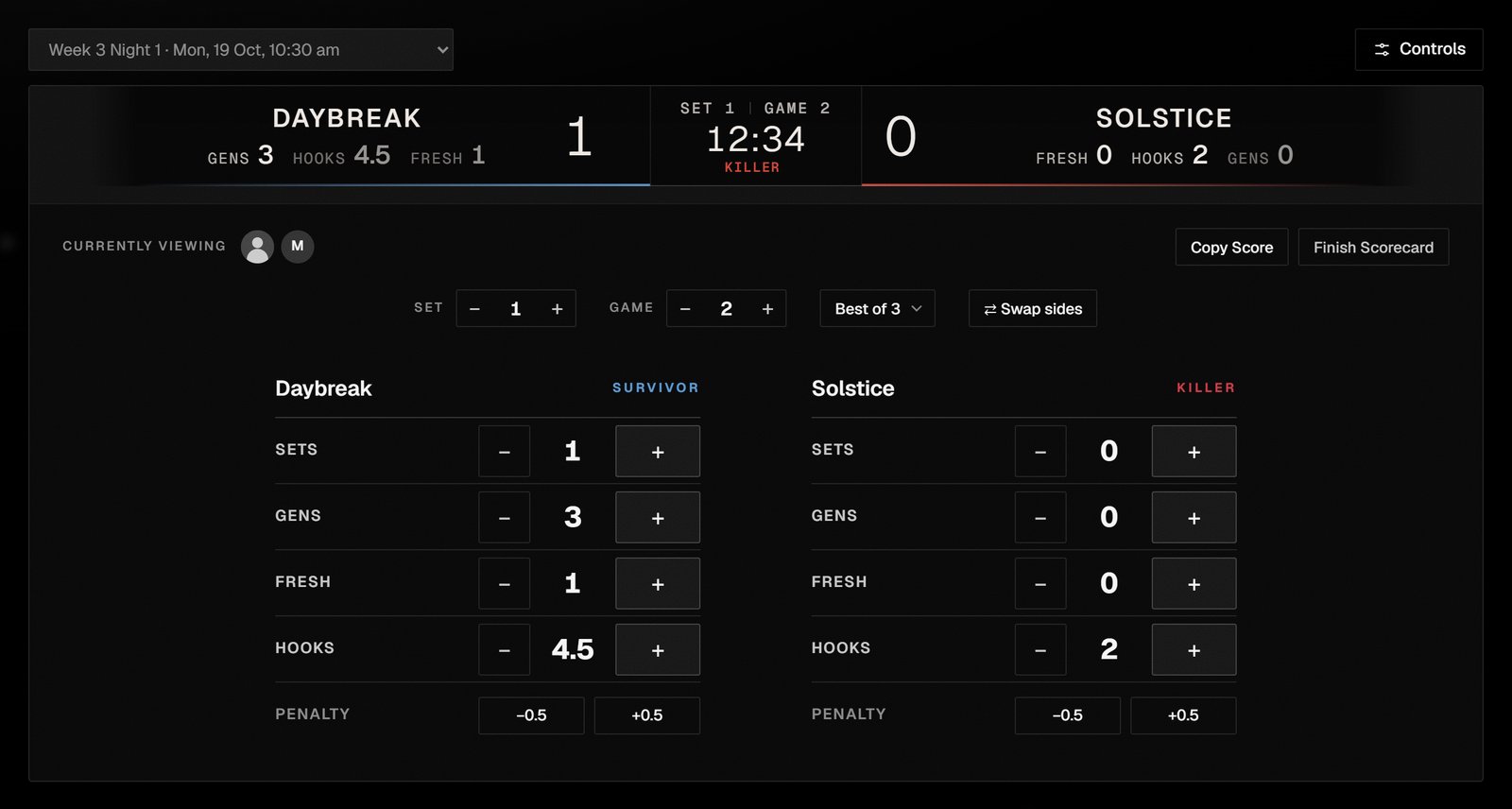
Live with a scorecard open.
1
Choose the stream
In the sidebar, select Broadcast → Live, and choose the stream from the list at the top.The choice applies to everyone using Live and to the scenes. It’s locked while a scorecard is open.
2
Start the scorecard
Choose the match from Match, which lists only this stream’s matches that are ready to start, then select Create Scorecard.The scorecard takes its teams and Best of from the match.
3
Check the sides
Each team shows its side for the current game: killer or survivor. If they’re the wrong way round, select ⇄ Swap sides.
4
Score the game
As the game is played, select + or − on each team’s Gens, Fresh and Hooks. Penalty takes half a hook off with −0.5 and gives it back with +0.5.These are totals for the whole match. Moving to the next game or set doesn’t reset them.
5
Move to the next game
Select + beside Game. The teams swap sides automatically.
6
Record each set
When a team wins a set, select + on its Sets, then + beside Set to start the next one. Changing Set doesn’t change Game or the sides: Game keeps counting through the match.
7
Finish the scorecard
When the match is over, select Finish Scorecard, choose the winning team under Who won?, and select Finish.The winner is saved on the match in the schedule, and “Finished. The winner is on the schedule.” confirms it. In-Game shows nothing until you start the next scorecard.
Share the score
Select Copy Score at any time to copy the current score, formatted for Discord. “Score copied for Discord” confirms it.Fix a mistake
- A wrong figure. Select −. Whole steps stop at zero.
- The wrong game or set. Select − beside Game or Set. Stepping the game back also swaps the sides back.
- The wrong format. Choose another Best of on the scorecard. When you finish, the match on the schedule takes the scorecard’s Best of.
Work with other operators
When someone else has Live open, their picture appears beside Currently viewing. Their changes reach your scorecard within a few seconds. If you both change the game at the same moment, Live refuses the second change with “The game changed in another Live view. Review it and try again.” If your access lets you change the scenes, Controls beside the stream list opens the scene controls next to the scorecard.Next steps
Plan the schedule
Add streams and matches, and correct a result.
Set up OBS
Get a broadcast PC ready for the scenes.